Fetch API vs Axios: Which One Should You Use in 2026?
Fetch and Axios are both popular web applications in JavaScript that are used for making HTTP requests like GET, POST, and PUT from the frontend application to the backend server.
In this article, we will go in depth to understand the concept of Fetch vs. Axios, including how to use both, what the major differences are between them, and which one you should use.
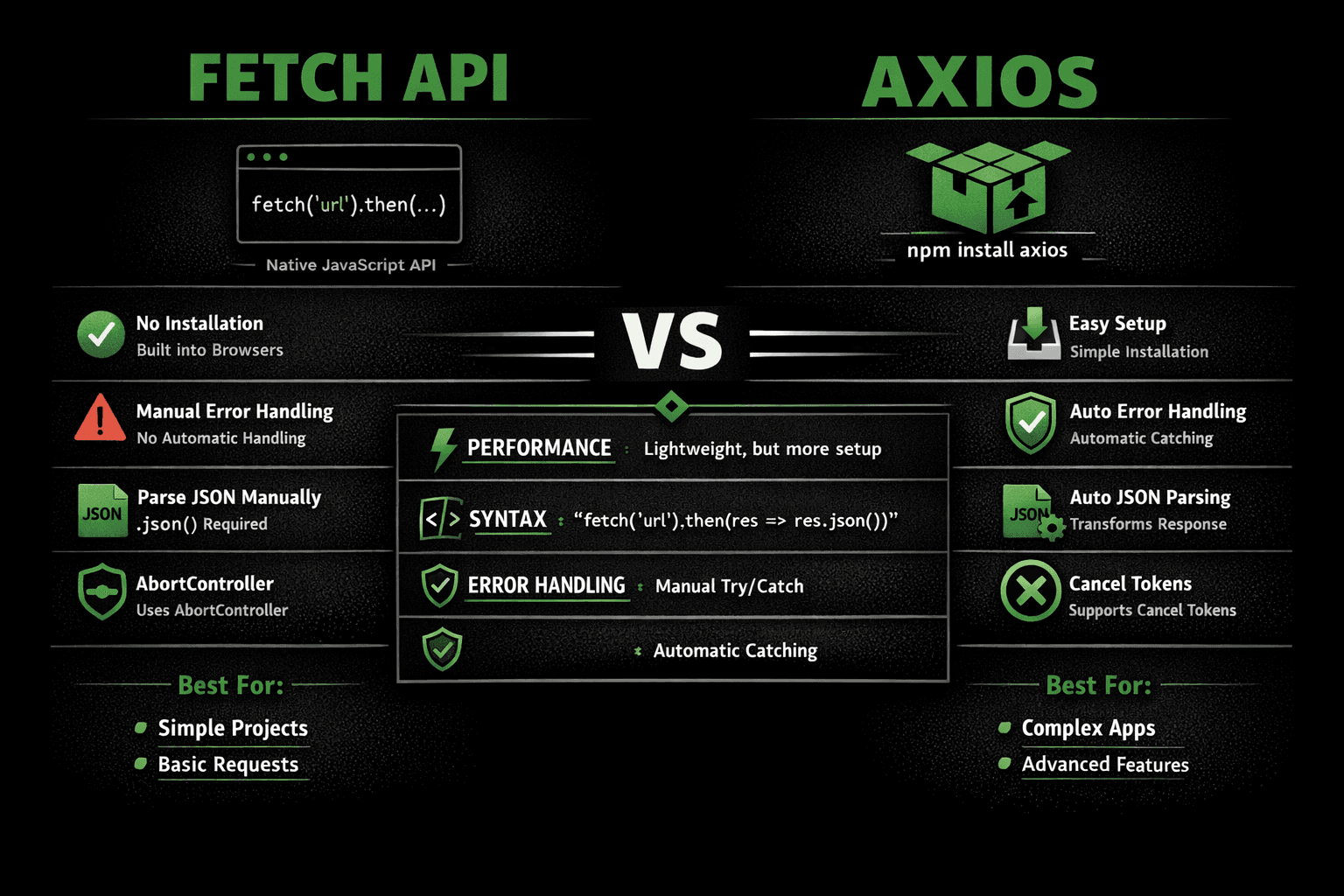
What is the Fetch API?
Fetch API is a built-in JavaScript interface that is used for making network requests for getting data from another server. You can use the fetch() method for calling the REST API. It is a replacement of the older XMLHttpRequest (XHR) method, as it is more powerful and flexible.
Fetch API requires manual JSON parsing with an additional step:
// Fetch API - Manual JSON parsing required
fetch('https://api.example.com/users')
  .then(response => response.json())
  .then(data => console.log(data))
  .catch(error => console.error(error));
Key Features of Fetch API
Fetch API comes with the following features:
- Built-in (no dependency): Fetch API is built into all modern browsers, so you do not need to install any external packages or libraries.
- Promise-based: Fetch API uses Promises to handle asynchronous operations, which makes the code more readable and easier to manage.
- Lightweight: Since Fetch API is built-in and does not require any external installation, it keeps your application lightweight and improves performance.
- Built-in Body Parsing:: FetcH Api has Response interface which comes with build-in body parsing methods for formating the data like ,response.json() used for json, response.text() is used for text etc.
What is Axios?
Axios is one of the most popular and open-source Javascript libraries used for making asynchronous API requests from a web browser to the Node.js environment..
Axios automatically parses JSON responses, reducing boilerplate code:
// Axios - Automatic JSON parsing
axios.get('https://api.example.com/users')
  .then(response => console.log(response.data))
  .catch(error => console.error(error));
Key Features of Axios
- Automatic JSON Parsing:Axios automatically transforms response data into JSON, so you don’t need to call
.json()like in Fetch. - Simple and Clean Syntax:Axios provides a cleaner and shorter syntax for making HTTP requests, which improves readability and developer experience.
- Better Error Handling:Axios automatically throws errors for HTTP status codes like 4xx and 5xx, making it easier to handle failures.
- Request & Response Interceptors:You can intercept requests or responses to modify them globally (useful for authentication, logging, etc.).
- Built-in Timeout Support:Axios allows you to set request timeouts easily to prevent long or stuck API calls.
- Request Cancellation:Supports request cancellation using AbortController or cancel tokens.
- Works in Browser & Node.js:Axios can be used both in frontend applications and backend (Node.js), making it very flexible.
Data Handling and Transformation
One of the most significant differences between Axios and Fetch lies in how they handle response data. Axios automatically transforms JSON responses into JavaScript objects, while Fetch requires a two-step process: reading the response and then parsing the JSON.
// Axios - Direct data access
const { data } = await axios.get('/api/endpoint');
console.log(data); // Already parsed JavaScript object

// Fetch - Two-step process
const response = await fetch('/api/endpoint');
const data = await response.json(); // Manual parsing required
console.log(data);
This automatic transformation in Axios makes code more readable and reduces the chance of forgetting to parse JSON responses, which is a common mistake when using the Fetch API.
Error Handling Approaches: A Critical Difference
Error handling is where Axios and Fetch differ most significantly. Axios automatically rejects promises for both network failures and HTTP error status codes (4xx, 5xx), making error handling more intuitive:
// Axios - Automatic error rejection
try {
  const response = await axios.get('/api/endpoint');
  console.log(response.data);
} catch (error) {
  if (error.response) {
    // HTTP error (4xx, 5xx)
    console.error('Error status:', error.response.status);
    console.error('Error data:', error.response.data);
  } else if (error.request) {
    // Network error
    console.error('Network error:', error.request);
  } else {
    // Other errors
    console.error('Error:', error.message);
  }
}
Fetch API only rejects promises on network failures, not HTTP error codes. You must manually check the response status:
// Fetch - Manual status checking required
try {
  const response = await fetch('/api/endpoint');

  if (!response.ok) {
    // Manually handle HTTP errors
    throw new Error(`HTTP error! status: ${response.status}`);
  }

  const data = await response.json();
  console.log(data);
} catch (error) {
  console.error('Error:', error.message);
}
This difference means Axios provides more developer-friendly error handling out of the box, while Fetch requires additional code for comprehensive error management.
Advanced Features Comparison
Axios excels in providing advanced features out of the box, including request/response interceptors, progress tracking, automatic request cancelation, and timeout configuration. The Fetch API requires custom wrappers and additional code to achieve similar functionality.
Request and Response Interceptors
// Axios - Built-in interceptors
axios.interceptors.request.use(config => {
  // Add authentication token to all requests
  config.headers['Authorization'] = `Bearer ${getToken()}`;
  console.log('Request sent:', config.url);
  return config;
}, error => {
  return Promise.reject(error);
});

axios.interceptors.response.use(response => {
  // Log all successful responses
  console.log('Response received:', response.status);
  return response;
}, error => {
  // Global error handling
  if (error.response.status === 401) {
    // Redirect to login
    window.location.href = '/login';
  }
  return Promise.reject(error);
});

// Fetch - Requires custom wrapper function
async function fetchWithAuth(url, options = {}) {
  options.headers = {
    ...options.headers,
    'Authorization': `Bearer ${getToken()}`
  };

  const response = await fetch(url, options);

  if (!response.ok && response.status === 401) {
    window.location.href = '/login';
  }

  return response;
}
Request Cancelation and Timeout
// Axios - Built-in cancelation and timeout
const source = axios.CancelToken.source();

axios.get('/api/data', {
  cancelToken: source.token,
  timeout: 5000 // 5 seconds timeout
});

// Cancel the request
source.cancel('Operation canceled by user');

// Fetch - Using AbortController (native API)
const controller = new AbortController();

fetch('/api/data', {
  signal: controller.signal
});

// Cancel the request
controller.abort();

// Timeout requires additional logic
const timeoutId = setTimeout(() => controller.abort(), 5000);
Upload/Download Progress Tracking
Axios provides built-in progress tracking for file uploads and downloads:
// Axios - Built-in progress tracking
axios.post('/api/upload', formData, {
  onUploadProgress: (progressEvent) => {
    const percentCompleted = Math.round(
      (progressEvent.loaded * 100) / progressEvent.total
    );
    console.log(`Upload progress: ${percentCompleted}%`);
  }
});

// Fetch - Requires manual implementation using streams
const response = await fetch('/api/upload', {
  method: 'POST',
  body: formData
});

const reader = response.body.getReader();
const contentLength = +response.headers.get('Content-Length');
let receivedLength = 0;

while(true) {
  const {done, value} = await reader.read();
  if (done) break;
  receivedLength += value.length;
  const percentCompleted = Math.round((receivedLength * 100) / contentLength);
  console.log(`Download progress: ${percentCompleted}%`);
}
Performance Benchmarks and Browser Support
Performance Comparison
Based on performance testing with 100 concurrent requests, Fetch API has a slight performance edge, executing at 1.077 seconds compared to Axios at 1.095 seconds. However, this 1.7% difference is negligible for most real-world applications.
Bundle size considerations:
- Fetch API: 0 KB (built-in to browsers)
- Axios: ~13 KB minified + gzipped
For performance-critical applications or projects with strict bundle size constraints, the native Fetch API has a clear advantage.
Browser Support and Compatibility
Fetch API Browser Support:
- Chrome 42+
- Firefox 39+
- Edge 14+
- Safari 10.1+
- No support for Internet Explorer 11
Axios Browser Support:
- All modern browsers
- Internet Explorer 11 with polyfills
- Node.js 4.0+
If your project requires support for legacy browsers like IE11, Axios is the better choice. For modern applications targeting recent browser versions, both options work equally well.
Quick Reference: Fetch API vs Axios Feature Comparison
| Feature | Fetch API | Axios |
|---|---|---|
| Installation | Built-in (0 KB) | npm install (~13 KB) |
| JSON Handling | Manual parsing required | ✓ Automatic JSON transformation |
| Error Handling | Manual status checks needed | ✓ Automatic promise rejection |
| Interceptors | Custom wrapper required | ✓ Built-in request/response interceptors |
| Request Cancelation | AbortController (native) | ✓ Built-in CancelToken + timeout |
| Progress Tracking | Manual implementation with streams | ✓ Built-in onUploadProgress/onDownloadProgress |
| Browser Support | Modern browsers only (no IE11) | ✓ All browsers including IE11 |
| Performance | ✓ Slightly faster (1.077s) | Minimal overhead (1.095s) |
| Learning Curve | Steeper (more manual configuration) | ✓ Easier, more intuitive API |
When to Use Fetch API vs Axios: Practical Recommendations
✓ Choose Fetch API When:
- You're building a lightweight application with minimal dependencies
- Your project only targets modern browsers (no IE11 support needed)
- You want to keep your bundle size small
- You're working with simple HTTP requests without complex features
- You prefer using native browser APIs without external dependencies
- Your team has experience writing custom wrappers for advanced functionality
✓ Choose Axios When:
- You need legacy browser support (IE11 compatibility)
- Your application requires request/response interceptors for authentication or logging
- You need upload/download progress tracking
- You want automatic JSON transformation and simpler syntax
- You need better error handling out of the box
- Your project involves complex HTTP operations with timeouts and cancelation
- You prefer a more developer-friendly API with less boilerplate code
Migration Guide: Converting Between Fetch and Axios
If you're considering switching from one to the other, here are the key conversion patterns:
From Axios to Fetch
// Axios
const response = await axios.get('/api/users');
console.log(response.data);

// Equivalent Fetch
const response = await fetch('/api/users');
const data = await response.json();
console.log(data);

// Axios with headers
await axios.post('/api/users', { name: 'John' }, {
  headers: { 'Authorization': 'Bearer token' }
});

// Equivalent Fetch
await fetch('/api/users', {
  method: 'POST',
  headers: {
    'Content-Type': 'application/json',
    'Authorization': 'Bearer token'
  },
  body: JSON.stringify({ name: 'John' })
});
From Fetch to Axios
// Fetch
const response = await fetch('/api/users', {
  method: 'POST',
  headers: { 'Content-Type': 'application/json' },
  body: JSON.stringify({ name: 'John' })
});
const data = await response.json();

// Equivalent Axios
const response = await axios.post('/api/users', { name: 'John' });
const data = response.data;
Conclusion: Making the Right Choice for Your Project
Both Fetch API and Axios are excellent choices for making HTTP requests in JavaScript applications. Your decision should be based on project requirements, browser support needs, and developer experience preferences.
Choose Fetch API if you prioritize minimal bundle size, native browser support, and don't need advanced features. It's perfect for modern web applications with simple HTTP request needs.
Choose Axios if you value developer convenience, need legacy browser support, or require advanced features like interceptors, automatic error handling, and progress tracking. The small bundle size increase is often worth the productivity gains.
Regardless of your choice, both tools are actively maintained and widely used in production applications. They continue to evolve with new features and improvements, ensuring they remain relevant for modern web development in 2025 and beyond.
Pro Tip: You can even use both in the same project! Use Fetch for simple requests and Axios for complex operations that benefit from its advanced features.
Frequently Asked Questions (FAQ)
Related Articles You May Like
- Top Coding Tips: Clean Code, Boost Productivity, Master Practices
Best Practices • Intermediate
- The Ultimate Guide to Code Debugging: Techniques, Tools & Tips
Debugging • Intermediate
- GitHub Actions: Complete CI/CD Automation Guide
Git • Intermediate
- How to Debug Laravel SQL Queries in API Requests: A Developer's Guide
Laravel • Intermediate
- Setting Up Gmail SMTP in Laravel: A Comprehensive Guide
Laravel • Intermediate
- Mastering Laravel Login System: A Comprehensive Guide
Laravel • Intermediate